
Add your first playlist
Nothing shows up until a playlist is in. There are four kinds, and the app treats them the same once they are loaded.
The four kinds
Section titled “The four kinds”| You need | Best for | |
|---|---|---|
| Xtream Codes | Server address, username, password | Most providers. Gives the app categories, films, series and a guide URL of its own |
| M3U link | A .m3u or .m3u8 URL | Providers that hand out a link instead of credentials |
| MAC portal | A portal address and the MAC your provider registered | Providers that sell access for a set top box |
| Local file | An .m3u file on the device | A list you built yourself, or one a provider emailed you |
Already have the playlist on another phone, tablet or TV? Send it over instead of typing it, see Moving to another device.
If your provider gave you a long M3U link that contains username= and password=, you almost
certainly have an Xtream account, use the Xtream form instead. It gets you categories, posters and
a guide that the plain link cannot.
On a phone or tablet
Section titled “On a phone or tablet”- Settings → Playlists → Add playlist, or take the offer on the first screen after you sign in. Every Add playlist button in the app opens the same screen.
- Pick Xtream Codes login, M3U playlist URL, MAC portal or Local file. Or pick Get a playlist from another device to have a phone, tablet or TV that already has it send it over.
- Fill the form and press Connect (Xtream) or Add playlist (M3U).
- Choose categories appears next. Keep everything, or tick only what you want, see Categories. A trimmed list downloads far less.
- Wait for the sync. A large provider takes minutes, not seconds; the app tells you which sections are done.
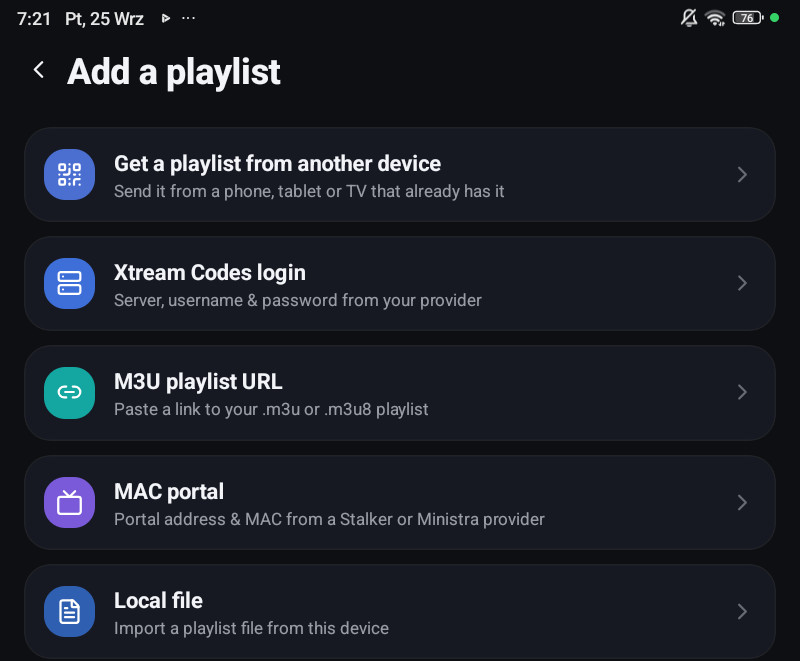
On a television
Section titled “On a television”Settings → Playlists → Add a playlist, or the first screen after you sign in. Typing a provider password with a remote is miserable, so the TV offers a shortcut:
- Add a playlist from your phone, the TV shows a QR code, you scan it with the phone that already has the playlist, and the credentials travel over encrypted. Details: Moving to another device.
- No phone? Enter details manually, the same forms, typed with the remote.
Either way the TV then shows Choose categories, then Setting up your playlist, then Playlist ready.
After it loads
Section titled “After it loads”- Live channels appear under Live (phone) or TV Channels and TV Guide (television).
- Films and series appear under Movies and Series, with posters filled in from TMDB once you connect it.
- The programme guide arrives on its own for Xtream playlists; for M3U you may need to point it at an XMLTV feed.
It did not work
Section titled “It did not work”- Wrong host, or a refused connection, see Xtream Codes.
- It loaded, but a section is missing, the provider answered for some sections and not others. The playlist’s row in Settings → Playlists says which, and tapping it retries just those.
- Everything loaded, nothing plays. That is the stream, not the list. See A channel or film will not play.