
Xtream Codes
An Xtream account is the richest kind of source: it hands the app categories, films, series and a programme guide of its own, none of which a plain link carries.
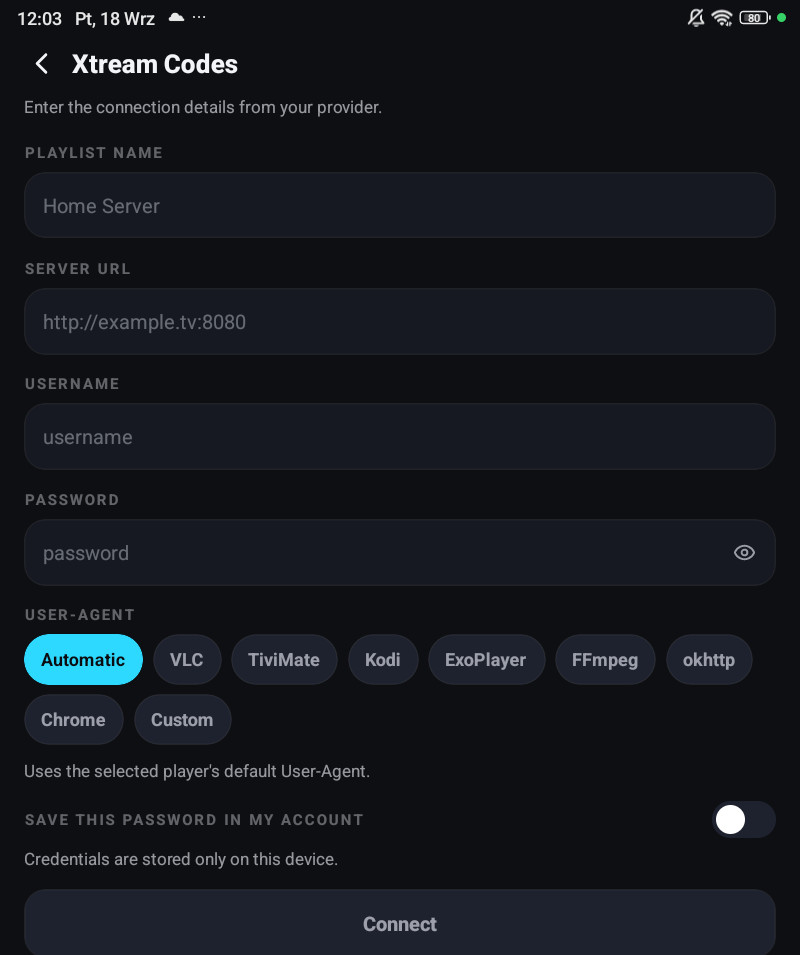
Adding one
Section titled “Adding one”Settings → Playlists → Add playlist → Xtream Codes login.
| Field | What goes in it |
|---|---|
| Playlist name | Whatever you want to call it. Only you see it |
| Server URL | The address your provider gave you, like http://example.tv:8080 |
| Username | From your provider |
| Password | From your provider. The eye inside the field shows what you typed |
| User-Agent | Leave it alone unless the provider asked for one |
Press Connect. The app checks the account, then asks which categories to download.
When the server is refused
Section titled “When the server is refused”The message the app shows comes from your provider, not from the app. The common ones:
| What you see | What it means |
|---|---|
| Wrong username or password | Exactly that. Check the password with the eye icon, a trailing space is the usual culprit |
| The connection was refused, or it times out | The host or the port is wrong, or the provider is down |
Unable to parse TLS packet header | You typed https:// on a port that speaks plain HTTP. Use http:// |
| HTTP 403 while something else is already playing | Your account allows fewer connections than you are using. See A channel or film will not play |
The app never adds https:// on its own, precisely because most panels answer plain HTTP on their
stream ports.
Spare stream hosts
Section titled “Spare stream hosts”Providers move streams between edge servers, and some hand out a second address for when the first goes quiet. Open the playlist’s edit screen and fill in Stream hosts, the app switches to a spare when the main one stops answering.
The User-Agent
Section titled “The User-Agent”Some providers only serve a particular player string, and a few block the default outright. The playlist’s edit screen has User-Agent with the common presets and a Custom User-Agent field.
Change it only if your provider told you to, or if channels return an error immediately while the same link plays in another app.
Its own id
Section titled “Its own id”The edit screen shows the Playlist ID the app knows this source by, and tapping it copies it. That id is what makes a bug report about one playlist actionable.
Your account at a glance
Section titled “Your account at a glance”On a phone, the pencil next to the playlist in Settings → Playlists opens its details. For an Xtream playlist they start with the account as the provider reports it:
| What it tells you | |
|---|---|
| Status | Whether the provider considers the account active, and whether it is a trial |
| Connections | How many streams are open right now against how many the account allows. Max reached means someone is watching |
| Expires | When the subscription ends, or No expiry |
If the provider reports that it has moved to a different address, the card says so and offers to switch.
Editing it later
Section titled “Editing it later”Changing the name, the User-Agent or the spare hosts is harmless. Changing the server, the username or the M3U address is not. The app asks you a question about your favourites first. See Refreshing and changing a source.