
Updates
There are two kinds of update, and which one you get depends on what changed.
| What it carries | How it arrives | |
|---|---|---|
| Over the air | Changes to the app’s own code | Downloaded inside the app. It offers them on startup |
| A new build | Anything touching the native side | From the store, or from the Downloader code on Fire TV |
Most releases are over the air, which is why the app can improve without you visiting a store.
How each platform gets a new build
Section titled “How each platform gets a new build”| Platform | Source |
|---|---|
| Android, Android TV | Google Play, on its own |
| iPhone, iPad, Apple TV, Mac | The App Store |
| Fire TV | The same Downloader code, 7083371, which always points at the current file |
| Windows | The app downloads and installs it itself |
Checking by hand
Section titled “Checking by hand”Settings → About & legal → Check for updates.
On builds that came from a store, this checks the store first and the over-the-air channel second, so it can tell you “there is a newer version in Play” rather than quietly offering you something smaller.
The banner, and Maybe later
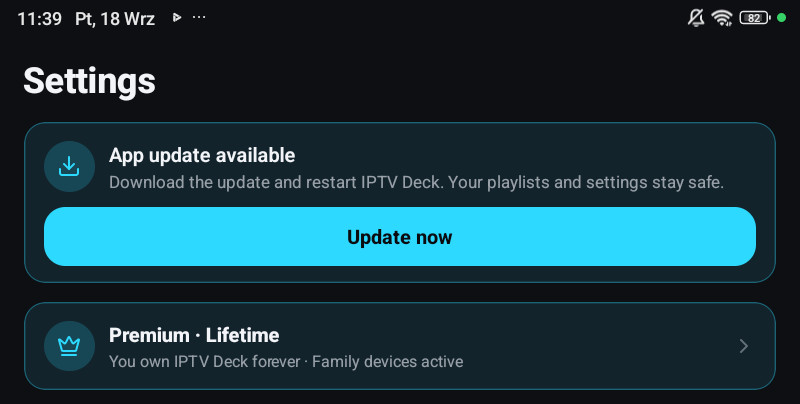
Section titled “The banner, and Maybe later”An available update arrives as a banner rather than a dialog in the way. Maybe later keeps that particular update quiet for three days.
Update now downloads and reloads the app at once. It waits only for an active recording.
Knowing exactly what you are running
Section titled “Knowing exactly what you are running”The footer of Settings → About & legal shows the version and the active update id. That id is the only unambiguous way to say what is on a device, because two devices on the same version number can be on different over-the-air updates.
Quote it in a bug report.
Nothing happens when you press Update now
Section titled “Nothing happens when you press Update now”- On a metered connection, the download may be waiting. Try it on Wi-Fi.
- If an update fails to start once, the app will not offer that same one again on that device. The next release fixes it, and there is no way to force the failed one.
- On Fire TV, an update that needs a new build shows a notice with the Downloader code instead of downloading anything.
What changed in each version
Section titled “What changed in each version”Every version’s notes are on Release notes, and the app shows them once after it updates.