
Several playlists at once
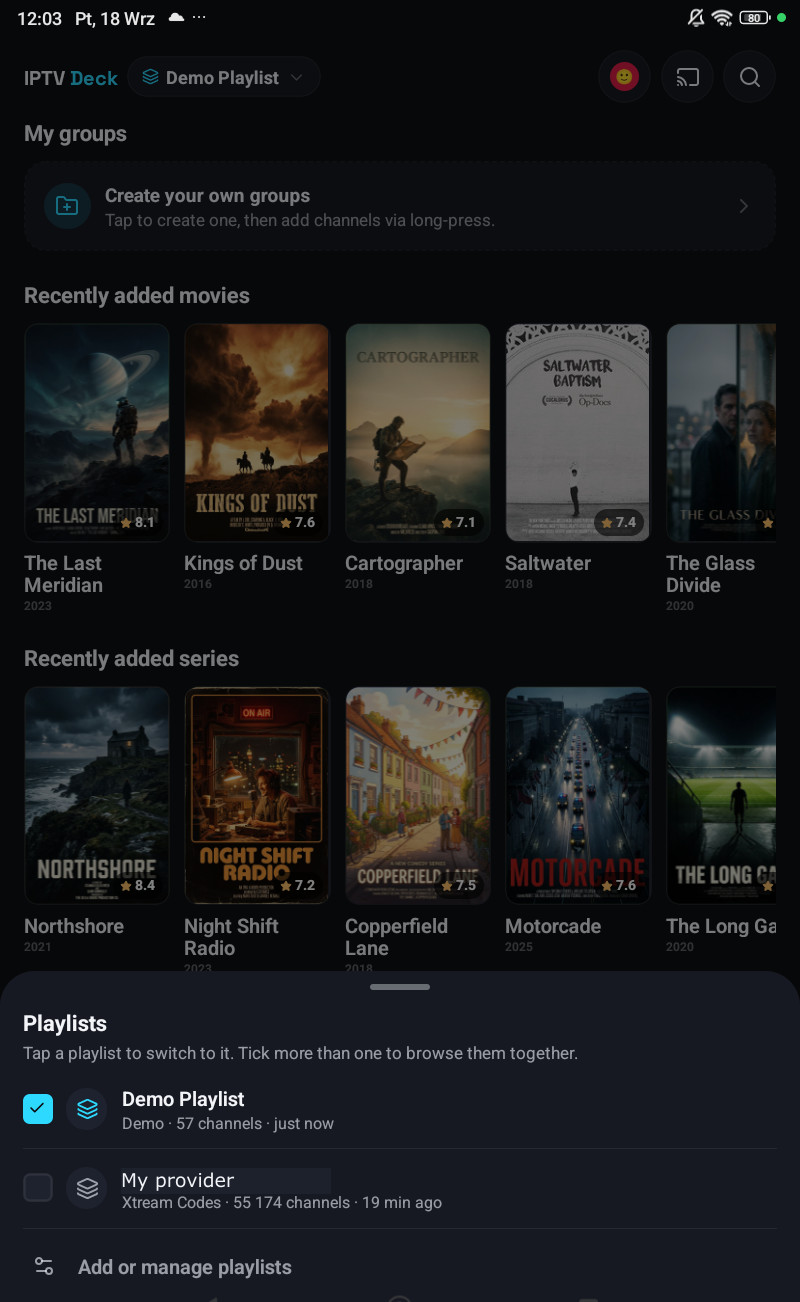
You can add as many playlists as you like and switch between them, or show several at the same time.
Switching
Section titled “Switching”The playlist switcher is at the top of Live, Movies and Series on the phone, and on the television it is the playlist name in the header.
Tick one playlist and the app behaves exactly as it always has. Tick more than one and the lists are shown together:
- Channels, films and series are concatenated in playlist order.
- Categories stay separate, under a heading per playlist.
- Every tile and row is marked with the playlist it came from.
- Titles are not de-duplicated, the same film from two providers appears twice, which is what you want when one of them is down.
Nothing is lost when you tick or untick
Section titled “Nothing is lost when you tick or untick”This is a hard rule in the app, not a side effect:
- Favourites, groups, history, the watchlist and reminders are kept exactly as they were.
- Filters and the category you were in are remembered per combination of playlists, so going back to a single playlist puts you back where you were in it.
- Positions in lists are parked per owner, so a list does not jump to the top when you change the selection.
Which playlists are open is per device
Section titled “Which playlists are open is per device”The set of ticked playlists does not sync. Your television can sit on one provider while your phone shows two. That is deliberate: the alternative is a television changing channel because somebody picked a different list on a phone in another room.
When you sign a new device in with a QR code, the code carries which playlists were open on the sending device, so the new one opens the same ones instead of guessing.
The guide with several playlists
Section titled “The guide with several playlists”Each playlist keeps its own guide sources, and each is refreshed on its own schedule. A playlist that has just been ticked fetches only its own guide; it does not drag the others along.
A channel is only matched against guide data its own playlist is entitled to, so two providers carrying the same station do not steal each other’s programmes.
Profiles can be limited to some of them
Section titled “Profiles can be limited to some of them”A profile can be held to a subset of your playlists, open it in Settings → Profiles & PIN, untick the rest, and that profile cannot see or switch to the others anywhere. See Profiles, PINs and locked categories.