
Encryption and the recovery code
There are two different things here and they are easy to confuse. Knowing which is which is the whole point of this page.
1. End-to-end encryption
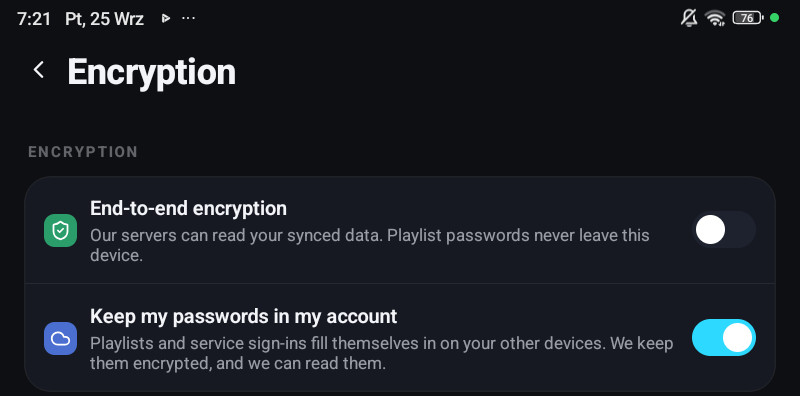
Section titled “1. End-to-end encryption”Settings → Encryption → End-to-end encryption, on a phone or a tablet. A television and a computer cannot turn it on; they only unlock it, see below.
With it on, your synced data is encrypted on the device before anything is uploaded. The key is derived from a recovery code only you hold, the payload is compressed and sealed with XChaCha20-Poly1305, and what reaches the cloud is one opaque blob.
There is no key on the server. Playlist URLs, logins and passwords cannot be read there, by us or by anyone who obtains the data.
With it off, the app says so plainly: Our servers can read your synced data. Playlist passwords never leave this device.
The recovery code
Section titled “The recovery code”54 characters in groups of six, with a checksum and no letters that look like digits. Type it on a second device and everything unlocks.
Show recovery code in the same section displays it. Write it down.
Lose it and the data stays encrypted. That is not a support problem that can be solved. It is the property you turned on.
The sync password
Section titled “The sync password”An alternative to typing 54 characters: set a sync password and use that to unlock a new device instead. The recovery code still works, and always will.
When a device says sync is locked
Section titled “When a device says sync is locked”A device that has your account but not the key shows Sync is locked and asks for the recovery code or the sync password. Until then it will not read your synced data, and playlists waiting in the account cannot be restored.
On a phone that is Settings → Encryption. On a television and a computer it is Settings → Sync → Unlock sync.
2. “Keep my passwords in my account”
Section titled “2. “Keep my passwords in my account””A single switch: Settings → Encryption on a phone, Settings → Account on a television and a computer. It decides whether provider passwords and your TMDB / OpenSubtitles sign-ins are stored in your account at all.
- Off: passwords and sign-ins stay on the device that typed them. A new device has to be given them, by QR code, or by typing them again.
- On: every device you sign in to has the playlist ready at once, with nothing to type and no code to carry.
A new account starts with it on. An account that already existed keeps what it had, which is off unless somebody turned it on. Without an account it is always off.
Turning the switch off removes the stored copies. Deleting a playlist removes its copy too. Signing out always behaves as if the switch were off.
Until version 1.7.1 this was three separate checkboxes, one in the Xtream form and one on each integration card, for what is one question about one account. It is one row now, and one setting for the whole account.