
EPG and Guide settings
Settings → EPG & Guide on a phone, Settings → Library → EPG & Guide on a television.
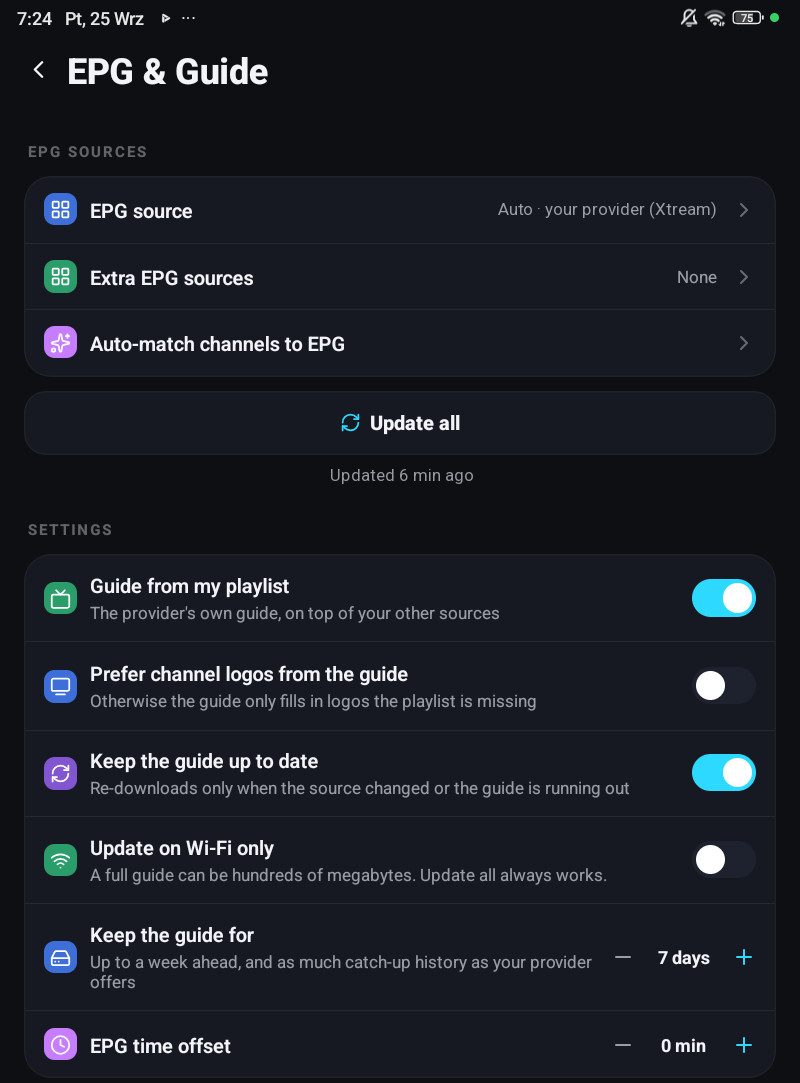
The screen has two sections, with Update all between them.
EPG sources
| Row | What it does |
|---|---|
| EPG source | What the app resolved for this playlist, Auto · host (Xtream), an XMLTV address, or Not set |
| Extra EPG sources | Any number of XMLTV addresses of your own |
| Auto-match channels to EPG | Runs the matcher over everything at once |
| Update all | Fetches every guide that is due, and shows under it when it last succeeded, or what went wrong |
Settings
| Row | What it does |
|---|---|
| Guide from my playlist | The provider’s own guide, on top of your other sources |
| Prefer channel logos from the guide | Otherwise the guide only fills in logos the playlist is missing |
| Keep the guide up to date | Re-downloads only when the source changed or the guide is running out |
| Update on Wi-Fi only | A full guide can be hundreds of megabytes. Update all always works |
| Keep the guide for | 1, 2, 3 or 7 days. Default 7 |
| EPG time offset | Shifts every programme, ±3 hours in half-hour steps |
On a television some rows are named differently: Extra guide sources, Match channels to the guide, Refresh the guide automatically and Guide time offset. The television’s section also has Clock and Refresh cached lists, which re-reads categories, groups and counts if something looks out of date. Reminders are under Saved & scheduled on a phone and under Playback on a television.
Keep the guide up to date
Section titled “Keep the guide up to date”Not a fixed schedule. The app re-downloads when the source says it changed, or when the guide it has is about to run out. A television that is on every evening therefore fetches far less than one that polls on a timer.
Keep the guide for
Section titled “Keep the guide for”This is about disk, not about how far ahead you can see.
A channel with a catch-up archive is exempt: it keeps as many days of guide as the provider says it archives, because otherwise the archive would have nothing to click on. On a large provider that alone is the difference between a few hundred megabytes and a few dozen.
It stays on the device. A television with 8 GB of storage and a phone have no business sharing this number.
EPG time offset
Section titled “EPG time offset”Some providers publish their guide in a timezone that is neither yours nor UTC. This shifts everything by up to three hours in half-hour steps, and it does follow your account, because it is a property of the source rather than of the screen.
Auto-match channels to EPG
Section titled “Auto-match channels to EPG”Runs the name matcher over the whole playlist and reports Matched N of M channels, All channels already have EPG, or Auto-match failed.
A match you made by hand is never overwritten by it. How the matching works is on Where the guide comes from.